The other day I came across this awesome program by accident
(I don’t even remember what I was actually searching for, but on the several
times I’ve looked for a program like this I’ve had no luck). It’s cool enough that I wanted to share it.
It’s called DesignDoll (website here) and it’s a program that lets you shape and pose a human figure pretty much however you want.
There’s a trial version with no expiration date that can be
downloaded for free, as well as the “pro license” version priced at $79.
I’ve only had the free version for two days so far, so I’m not an expert and I
haven’t figured out all of the features yet, but I’ve got the basics down. The
website’s tutorials are actually pretty helpful for the basics, as well.
Here’s the page for download, which has a list of the
features available in both versions.
There are three features the free version doesn’t have:
Can’t save OBJ files for export
Can’t download models and poses from Doll
Atelier (a sharing site for users; note that the site is in Japanese, though)
It can’t load saved files
The third one means that if you make a pose, save it, and
close the program, you can’t load that
pose/modified model later. You have to start with the default model. I
found that out when I tried to load a file from the day before (this is why
reading is important…). Whether saving your modifications (and downloading models and poses) is worth $80 is up to you.
But, the default
model is pretty nice and honestly if all you’re looking for is a basic pose reference
it should work fairly well as it is. Here’s what it looks like:
There’s a pose tag
that lets you drag each joint into place and rotate body parts. The torso and
waist can be twisted separately, and it seems like everything pretty much
follows the range of movement it would have on an actual human.
Even the entire shoulder area is actually movable along with the joint! See, like how the scapular area of the back raises with the arm:
The morphing tag
is one of the coolest features, in my opinion. It lets you pick and choose from
a library of pre-set forms for the head, chest, arms, legs, etc. It has some more realistic body shapes in addition to more anime-like ones. Don’t like the
options there? Mix a few to get what you want! Each option has a slider that
lets you blend as much or as little as you want into the design.
So you, too, can create beautiful things like kawaii
Muscle-chan!!
The scale tag
lets you mess with the proportions and connection points of different joints. This
feature combined with the morphing feature not only allows more body shape
variations, but it also means that you can do things like make a more digitigrade
model if you want. (The feet only have an ankle joint, but for regular human poses that’s all that you really need, so whatever.)
Or you can make a weird chubby alien-like thing with giant
hands and balloon tiddies if that’s more your thing.
The ability to pose
hands to the extent it allows is far more than I could have hoped for from
a free program. Seriously, you can change the position of each finger joint individually, as well as how spread out the fingers are from each other. Each crease on the diagram below is a point of movement, and the circles are for spread between fingers.
And to make it a bit more convenient, there’s a library of pre-set hand poses you can pick from as well, and then change the pose from that if you like.
In both versions, you can also import OBJ files from other places for the model to hold, like if you wanted to have them hold a sword or something.
Basically, this program is awesome and free and you should
totally check it out if you want a good program for creating pose references.
I just wanted to add a little more to this. If you have trouble figuring out how light sources work in your drawings this also allows you to choose where to have a light source.
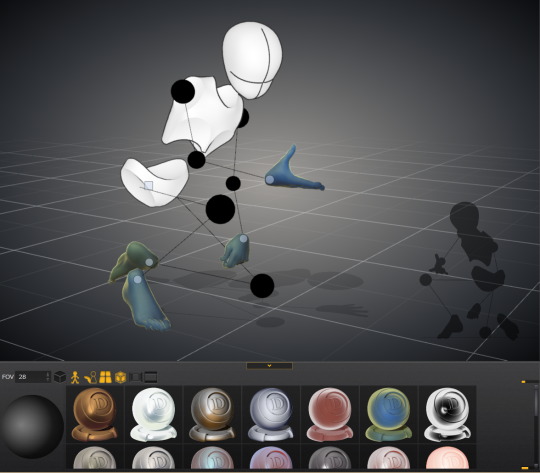
That shaded ball on the left is your light source. You can see how moving the point changed the shadow cast.
Oh and all those other nifty looking things in that bottom bar there, yeah it’s what you think. You can change the model color to one of these presets or even customize your own palette.
Plus for all you lovely people who want something a little more simplified to use as a pose reference
You can turn your model into the classic wire frame.
Why reblog this? Because for more visual creators, this will be like the lumberjack discovering chainsaws. “Reblog to save lives” as the saying goes.
Ratcatchers: Especially in an urban campaign, this term is chosen specifically to disrespect and belittle adventurers. It comes from a more literal place, people who catch and dispose of rats and other vermin. It implies that adventuring is dirty work, unprofitable, undeserving of praise or respect.
Mercenaries: This one is more matter-of-fact. It’s still not a respectful term by any means, but there is a sort of professionalism to it. It also implies greed, that the PCs aren’t willing to do anything without the promise of pay. Also, there is the assumption that they are going to choose the violent solution to any problem, unless
Mercs: You might think this would be the same as mercenaries, but there is a wholly different intent behind the shortened version. This term assumes that the PCs are aggressive, that they only solve problems with violence. Not only that, this term implies that the violence isn’t just a means to an end, but something they actually enjoy.
Rogues: Not in the same context as the class. This is used to describe people who are likable despite their lawlessness. There is an implied charisma or charm, but also the assumption of greed as primary motivation.
Scoundrels: Like rogues in almost all ways, but without the requirement of likability. Still charm and charisma, just often more sleazy than actually likable.
Madcaps: Again, similar to rogue, but with a heavy implication of madness. Villagers who live near a haunted forest might call adventurers who go in there “madcaps.”
Bounders: Like scoundrels, but even without an implied charm. These are people without any sense of honor, motivated purely by greed.
Fixers: This one is straightforward. It doesn’t actively disrespect the PCs, but it also doesn’t elevate them above others. They are simply here to fix a problem, and after the problem is fixed, they’re useless.
Dungeoneers: This one is certainly more specific. It is similar to mercenaries, in that it doesn’t carry any respect, but it does have a professional air. Unlike mercenaries, there is an implied intelligence; a dungeoneer is an expert at dungeon-crawling. There isn’t as much of an emphasis on violence, instead there is an implied sneakiness. However, there is still an implication that greed is the primary motivator.
Explorers: This term may not be used for most PCs, but when it does apply, it is used in a respectful manner. It assumes even more intelligence, and it implies a scholarly bent, that the PCs are motivated by knowledge, not greed.
Wanderers: Like explorers, but without motivation.
Vagabonds: Like wanderers, but with the implication of being problematic to the community. Or, a sort of wandering scoundrel.
Pathfinders: Like explorers, but with the implication that they are clearing the way for the spread of civilization. There is an honor to this word, but also more implication of risk or danger.
Adventurers: There is more of an air of respect in this. The use of the word “adventure” implies a sort of storybookishness, there’s less of an implication of dirt and greed.
Heroes: This is a word chosen specifically to praise the PCs. It implies selflessness, a need to help others, and a certain level of competence.
Champions: Heroes, but tied to a specific place or group. The pinnacle of a community.
(I made this because it gets boring listening to NPCs saying the word “adventurers” all the time.)
As much as I like to complain about my weaknesses when it comes to writing, I’m happy to say that creating characters isn’t one of them. So for anyone who wants it- my quick guide on creating characters.
This list is for anyone who has a vague idea for a character but doesn’t have a plot or a role in the story for them to fill.
It’s for people who have a plot in mind, but lack characters to place in it.
It’s for people who love those long, detailed character spreadsheets, but don’t have the patience (or know all the answers) to fill them out. The points I’ve listed below will probably overlap heavily and influence one another- for instance, “societal/cultural influences“ may inform both “philosophy“ and “defining relationships“. It pulls the character together.
Keep in mind that this is not everything you want to know about your character- you should continue to flesh them out as you write them. This is just a baseline, a starting point, an I-just-want-to-write-something-with-this-character-but-I-know-absolutely-nothing-about-them list so you can jump into writing with or without a plot in mind. It describes them as they are on a typical, ordinary day. As you continue to write and develop them, they will become more nuanced and take on a life of their own.
Base Personality
Jot down some base personality traits. Don’t worry about getting an equal number of positive and negative traits down- or even which is which. Just feel out the character’s base personality.
Significant Historical Events
What events have had the greatest impact on your character (that you know of so far)? Again, don’t worry about getting everything- you can always add more here as they come to you later. Hit the major turning points in your character’s life.
Societal/Cultural Influences
What societal and cultural backgrounds do your characters have? Are they living/working/existing in an area where these influences are the majority or the minority?
Philosophy
What is your character’s default philosophy when it comes to right and wrong, or difficult moral choices? (I usually use the D&D alignment system for its simplicity- feel free to be as detailed or not as you wish).
Defining Relationships
What are this character’s defining relationships? Enemies, friends, and family are good places to highlight.Major conflicts and points of contention are great starting points for plots.
Goals
What does your character want more than anything? What are you preventing them from getting over the course of the story? If any minor goals pop up while you’re writing, jot those down too.
ALRIGHT, so, I know a lot of people have trouble making eyes match. Yesterday I found out a way to make it significantly easier! Here’s a small guide.
Well, first of all, you have your face. mark where the eyes should be on it.
Then mark the corners of the eyes and go over the middle again, to make the next step easier
Alright, I know it sounds a bit crazy, but draw this shape, trying to make it as symmetrical as you can.
Draw the eyes using that shape as a guide and TA-DA! They match! For different eye shapes you tweak the angle of the two guide lines.
And it also helps with angles where the size and shape of the eye is distorted, you just put it in perspective.
I think the theory behind it is that the thing that makes it hard to make the eyes match is the angle of the corners, and this type of guideline helps make them even, which makes the eyes look symmetrical. Welp, here it is! I hope it helps someone!
This is useful af; I can’t write in silence but I also don’t like music or intelligible voices (like a movie or TV show). Tonight I wrote to “Ocean Storm” as I was writing a scene where my characters are trapped together in a lighthouse during a storm.
This post lead me to my favourite ambient noise channel on YouTube, Guild of Ambience (here listed mostly as “historical”). I particularly like the pirate ship sounds, potion shop sounds, and cave sounds TGoA has created.
I don’t need to add too much explanation today. A cape, cloak or long coat simplifies the silhouette of most character, gives them a unique look or presence and conceals a lot of the overall anatomy. Keep track of the character underneath to know where to fold, drop or stretch the fabric. The fabric itself should play a role too. Different behave differently. Movement and gravity are key to “ground” your character in the environment and make it look believable.
-Norm @grizandnorm #capeitsimple #100tuesdaytipsbook #100tuesdaytips #arttutorial #arttips







 Pidge's Blog backup
You must be logged in to post a comment.